Posts

Final Presentation and Plans

Since last week I have been thinking of what could be used for my final project for the class. I would like to go with the idea of setting up a virtual production set with my added light fixtures and Unreal commands. After a brief talk with Professor Nick, he mentioned that his current Independent Study class was interested in setting up the X-Wing in studio for virtual production. Since I already help out with this class as a TA, I thought I can jump on board to use this opportunity to set up my final DIGM540 project. Here are the final steps I have in mind for this project in order of importance: Figure out wireless connections between Aputure lights and program them to imitate moving lighting in the virtual scene Integrate LED strip lights to the scene and set them up with DMX Add on speech recognition and run lighting commands through speech AI Ideally, my schedule for the upcoming weeks would look like: Week 8: Aputure lights Week 9: LED strip lights Week 10: Voice commands Finals...

More Lights and Fixtures!

Image
I found some new toys to play with and test DMX! These are Aputure Lights that were added to the studio a few months ago. So far, I don't think anyone has used these lights for anything other than a constant RGB color. However, they have DMX capabilities! And the case includes a USB-C to 5-pin DMX converter! So of course, I had to try them out... I started off by connecting one of the lights to the second port of Net3 Gateway. The first port is still occupied by the ADJ light since I want to try and use 2 different fixtures at the same time. Next, I worked on adding the new light fixture to my Unreal project. Working in the same DMX Library, I created a new fixture. It mostly had the same settings as the ADJ fixture, except I added only 3 attributes: Red, Green, and Blue. The intensity attribute might also be a feature in Aputure lights, but I need to read the manual further to see what other attributes are available. To figure out the DMX address and starting channel of the new li...

Pixel Mapping

Image
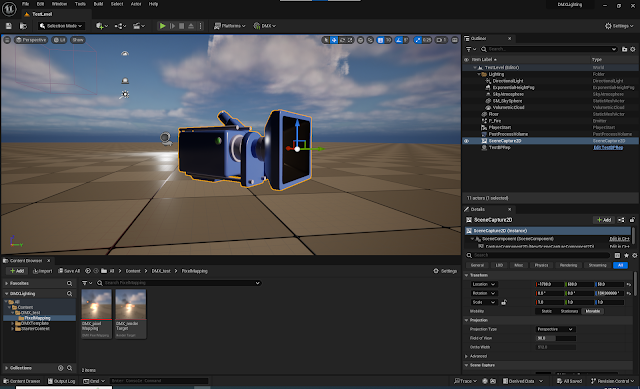
Here is one of the ideas that got stuck with me since the first week of class: taking the light information from a camera or a specific point in space in Unreal and doing some calculations to send the average color into a DMX light in the studio. While looking for information or ideas on how to achieve this, I've come across an Unreal feature called Pixel Mapping. And yes... this feature was exactly what I had been thinking of creating all this time, so turns out I don't have to reinvent the wheel! Here is the Unreal Pixel Mapping documentation with more detailed information. Since this feature didn't seem too complicated to set up, I wanted to give it a try and see how customizable it can be. This process simply has 3 main actors... 2D Scene Capture Camera: This camera is how the artist can decide which area in the scene will be captured in view and used for color averaging. Render Target: This actor takes the output from the camera and turns it into a texture. Pixel Mapp...

New Idea: Audio Commands for Lighting

Image
An idea that struck me out of nowhere this week was the ability to control DMX lights through voice commands. I'm thinking that in a one-woman show in a studio, different lighting pre-sets could be created in advance. And during the show, Unreal could be listening for voice commands and switch programs based on the words/phrases. I don't think Unreal Engine has an inherent voice recognition program. However, I found this free plugin in the Unreal Store and it somewhat looks promising. Apart from Unreal's store, I've found that some people had success using Meta's voice recognition in the engine. I'm not yet sure which plugin they used or how they set it up, but I think it's a promising option to follow if the Runtime Speech Recognizer plugin doesn't work. I'm planning to also reach out to another student in Drexel who has experience with Meta's voice recognition and get some feedback for my project!

Lighting Options with DMX

Image
One of the earlier ideas I had this quarter was to create a studio lighting setup controlled from a virtual environment, but make it indie. Most of the equipment I've used to far have already existed in the studio, but they may not be the most cost effective options for a smaller studio or an independent creator. ADJ Mega Par Profile Plus These are the light fixtures we've been using in the studio for some time now. I've been testing DMX in Unreal with two extra fixtures we have laying around in the cabinet. However, this exact model lights are $115 each and it may not be feasible for an independent creator who would need multiple lights for a scene. There are of course cheaper options for par lights from different brands. But I can't say anything on its quality or how long it'll last. Aputure MC Pro These are the new lights we have in the studio and to be honest, they're pretty damn cool. However, a kit with 8 lights costs a whooping $1900! While these lights a...

DMX in Unreal Engine

Image
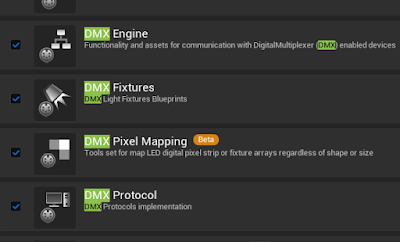
Though I dived into Unreal DMX setup without confirming if my lights were properly connected, I eventually figured out how to get them to work through the engine! My main sources were the Unreal documentation and this specific  tutorial on Youtube. There are many tutorials that show cool DMX stuff that can be done in Unreal, but I've realized that only a limited few actually show how to pipe in the equipment into Unreal Engine or set up the network connections. Here are the steps I followed to get the lighting to work with Unreal: Creating a project and enabling plug-ins. I chose to create a DMX template project, which already came with all necessary plugins enabled. Changing project settings. I created a new "Output Port" and adjusted the settings based on the hardware and network I used. (The first 3 ports are the pre-existing ones from the project template.) - Net3 Gateway uses sACN protocol instead of Art-Net. - "Network Interface IP Address" is the main ...

Devices and DMXControl 3

Image
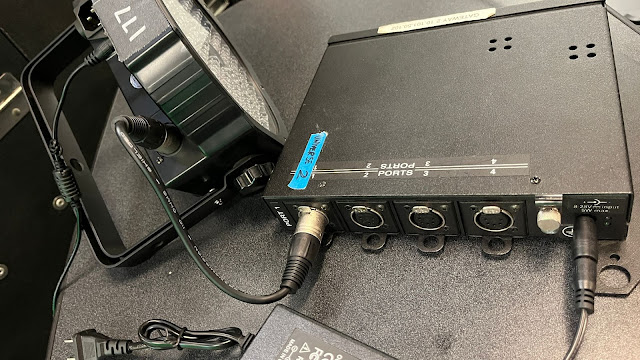
After getting Net3 Gateway working, I connected my light to the network box. All 4 ports of the box are 5-pin DMX ports. Both input and output from the light are 3-pin DMX ports. To connect both equipment together, I used a (very short) DMX pin converter. Devices in Concert The Concert software allows the user to add different devices besides Gateway. It also controls the connections through the network map. Most devices can also be configured for their IP address and other settings. I thought this way, I could also connect the DMX light to the network box and check if it's working. However, there weren't any existing device options in Concert that worked for the DMX light I had. I think either the software only allows their own ETC devices or the specific light I had didn't have any input going back to the network box, thus no way to check if it was properly connected. Before moving on to Unreal, I just wanted to send a very simple data package to check if the light was co...